Return deposits and refunds
Return a security deposit, refund an overpayment, or settle a cancelled booking straight from the booking's Finance tab. No more detours through your payment provider's dashboard.
The next-step card
Once a trip has ended (or the booking is cancelled), a next-step card appears on the Finance tab whenever money still needs to move. A To do badge means it's your turn; a Waiting badge means the ball is with the customer. The headline names the action and the amount, one sentence says why, and the button does it:
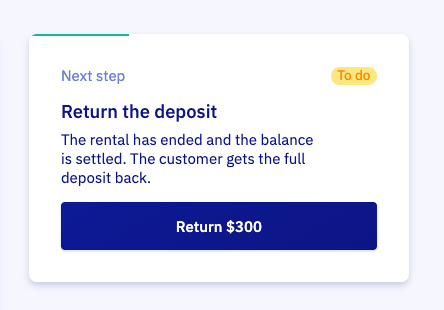
- Return the deposit: balance settled, the customer gets the full deposit back
- Return the remaining deposit: the customer still owes you something. It comes off the deposit first. If they owe exactly the deposit or more, the button becomes Deduct deposit, and you collect the rest afterwards
- Return the deposit and overpayment: both go back together
- Refund the overpayment: the customer paid more than the booking total
- Collect the open balance: the rental has ended and no payment link is open. If a link is open but doesn't cover the full balance, the card asks you to collect the remaining part
- Settle the cancellation: refund what the customer paid, minus a cancellation fee if you charge one
- Waiting for the customer to pay: a payment link is open, nothing to do until it's paid or expires
If the customer no longer owes anything but old payment links are still open, the card offers to revoke them so nobody pays by accident. Once the money is flat, the card disappears.
If the booking carries flagged notes, the card shows them right there, so you check the damage report before you return the deposit.
Return a security deposit
- Open the booking and go to the Finance tab
- Click Return security deposit
- Choose Return in full, or Partially return to withhold costs
- Click Return now
With a partial return you add cost lines for what you're keeping: $50 for that scratch, $25 for the fuel top-up, each with its tax rate. The modal shows the deposit, the costs, and the amount to return, so both of you see exactly what was withheld and why. You can also hold part of the deposit back for now and return the remainder later.
Want a note for your own records? Toggle Add internal note. The customer never sees it.
The money returns through the original payment method and the customer gets an email. A refund cannot be cancelled once it is sent, which is why the modal asks you to confirm. Mollie holds refunds for about 10 minutes before executing them.
When the customer still owes you
If there's an open balance and you're holding a deposit, the modal opens with Collect open balance from the security deposit already ticked, so the amount to return matches what the next-step card promised. It shows how much the deposit covers and what stays open; if the deposit covers it all, the booking is settled in one go. Untick the box if you'd rather return the full deposit and collect the balance separately.
Refund an overpayment
Paid too much? The next-step card offers to refund the difference. If a deposit is being returned at the same time, both go back in one action.
Cancelled bookings
For a cancelled booking with payments on it, the card offers to settle the cancellation. The modal follows the money and opens on the mode that fits:
- Refund overpayment: the price came down after the customer paid, for example through a discount. Only the amount above the booking cost goes back; the booking cost stays with you
- Full refund: the whole rental payment goes back, and whatever booking cost remains is written off
- Cancellation fee: add the fee lines you're charging. The fee comes off the rental refund first, only what's left over is covered by the security deposit, and the rest of the deposit goes back
The breakdown always shows the rental payment, the deposit, the fee, and the amount to refund, which is exactly what the customer receives.
After you confirm, the booking's costs end at what you kept, so the balance is flat and the booking leaves the wrap-up list on its own. Returning just the deposit on a cancelled booking leaves the costs untouched.
When there's nothing to refund
If the costs you withhold add up to the whole deposit, the deposit is captured and no refund is sent. The customer doesn't get an email either, because nothing changed for them.
Who can do this
Returning deposits and refunding requires the refund permission on your role. Set it under roles and permissions.
Settling one booking is nice. Settling the whole day is nicer: see the Booking wrap-up page.