Payment terminals
Charge a booking right at the counter. A remaining balance, a walk-in, or a drink someone grabs on the way out: add it to the booking and tap it off on a card reader, so nobody gets sent off to pay somewhere else.
Get a card reader
Order a reader from your payment provider:
With Mollie you can also use Tap to Pay straight from your own phone, no extra hardware needed.
Set up your terminals
The terminals page shows the readers that are paired with your Mollie or Stripe account. Pairing itself happens at your payment provider; Let's Book syncs the list from there, so you never set up a reader twice.
Open terminal settings →- Pair your reader in your Mollie or Stripe dashboard
- Using Mollie? Click Connect terminals on the integrations page once, so your Mollie connection covers terminals too. Stripe needs no extra step
- Click Sync now, and every reader on your provider account appears in the list
- Click a terminal to open its settings
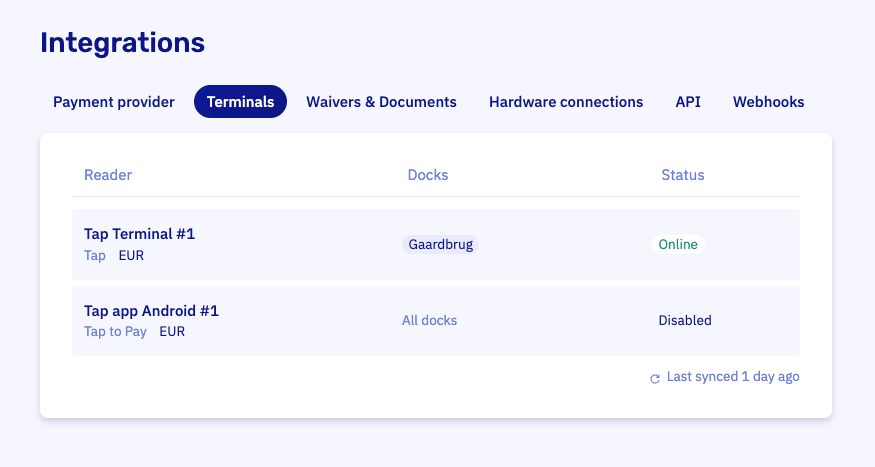
Each terminal has two settings of its own:
- Use with Let's Book decides whether the reader is offered as a payment option when charging
- Used at limits the reader to specific docks, so staff only see the readers at their location. Leave it on All docks if one reader serves your whole operation
The list shows each terminal's live status (Online, Offline, or Pending), synced from your provider. Just paired a new reader? Click Last synced above the list to sync again on the spot.
Charge a booking
- Open the booking and go to the Finance tab
- Click Collect payment and pick Terminal
- Check the amount and description, both pre-filled with what's open
- Select your reader and hand it to the customer
You follow the payment live in the modal: connecting, waiting for the tap, paid. The payment lands on the booking like any other, so your books stay right automatically.
Good to know
- Terminals charge payments. Security deposits are charged upfront with the booking and returned from the booking afterwards.
- Anything you add to the booking on the spot (add-ons, extra costs) is included in the open balance, ready to charge.